From Two Hours to Two Minutes: Fixing a Morning User Sync That Blocked Client Onboarding
How we freed a UK law firm from a legacy integration bottleneck, cutting their daily Intapp Intake and Aderant user sync from nearly two hours down to under two minutes.

Every morning at 6:00 AM, an integration job kicked off at a UK law firm to synchronise staff profiles and permissions between Aderant Expert (their practice management system) and Intapp Intake (where lawyers onboard new clients and open matters).
That job, written by a previous supplier, took nearly two hours to finish.
While it was still chugging along at 8:00 AM, fee earners and support teams arriving for work were effectively blocked. New client and matter requests sat waiting behind the morning backlog. If a lawyer had recently joined, changed roles, or been added to a new practice group, their requests could fail outright or be assigned to the wrong person.
Our tagline at Pronounced80 is freeing business from the tyranny of legacy software, and this was a textbook example. After we re-architected the legacy sync pipeline, the entire morning run now finishes in under two minutes, long before anyone has made their first cup of tea.
Here is a look at what was causing the two-hour bottleneck in the previous design, and how we fixed it.
Why the Morning Sync Existed in the First Place
In this legal practice, Aderant holds the master records for finance and employees, while Intapp Intake runs the workflows for client onboarding, conflict checks, and opening new matters.
Overnight, an upstream job resets certain staff identifiers inside Intapp Intake’s directory. Every morning at 06:00, the Azure Integration Layer has to republish the active staff roster from Aderant into Intapp Intake so that every lawyer, partner, and support staff member has their matching identifiers and security groups restored for the working day.
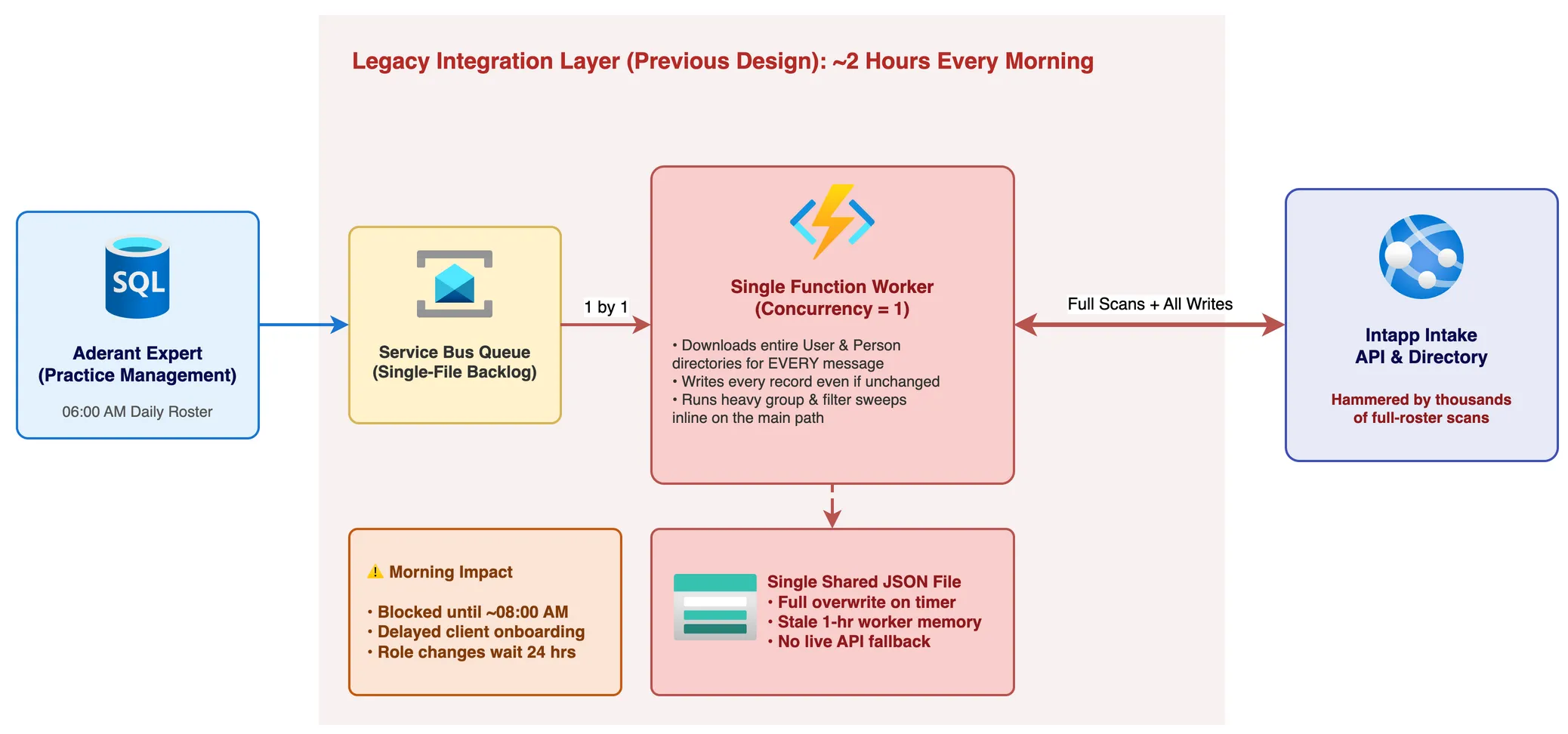
On paper, syncing a firm’s staff directory once a morning shouldn’t take two hours. In practice, the previous design had four major bottlenecks compounding on every single message.
What Was Going Wrong in the Legacy Code
1. Downloading the Entire Directory for Every Single Person
When a staff update message arrived on the Azure Service Bus queue, the Azure Function processing it needed to check if that person already existed in Intapp Intake.
Instead of looking up that one person, or keeping the directory in memory for a few minutes, the legacy function downloaded the entire User directory and the entire Person directory from the Intapp Intake API on every single message.
Because it did this for every staff member in the morning run, the integration was making thousands of full-directory API scans between 6:00 AM and 8:00 AM. Most of the two hours was spent downloading the exact same list of people over and over again.
2. Updating Records Even When Nothing Had Changed
For the vast majority of staff on any given Tuesday morning, their name, email address, timezone, and active status haven’t changed since Monday.
The legacy sync didn’t check. It pushed full updates back to the API for every person on the roster regardless of whether a single field was different. That meant thousands of unnecessary HTTP writes every morning, adding both latency and API rate-limit pressure.
3. Heavy Housekeeping on the Main Processing Path
Right in the middle of syncing a user’s core details, the same function also ran heavy background housekeeping, reconciling all of their security group memberships and sweeping through colleague filter rules.
Because every message was mutating shared group structures sequentially, the system couldn’t run more than one worker at a time. The Service Bus trigger had to be locked to a concurrency of 1. Every staff member had to wait in a single-file line.
4. A Single Shared JSON File for Identity Lookups
Whenever a lawyer submitted a New Client or Matter Maintenance form during the day, the integration needed to translate the people named on the form (such as the Relationship Manager or Responsible Lawyer) from their Intapp Intake profile into their matching Aderant employee record.
To do that, the previous design relied on a single large JSON file in Azure Blob Storage that was completely overwritten by a timer job, then cached in worker memory for an hour:
- If a new starter was added or updated during the day, workers holding an older in-memory copy of the JSON file wouldn’t recognise them.
- If an upstream API hiccup returned an incomplete list during a rebuild, overwriting that single file could break user lookups across the entire platform.
- If a user wasn’t in the JSON file, the workflow simply failed. There was no fallback to check the live system.
How We Fixed It
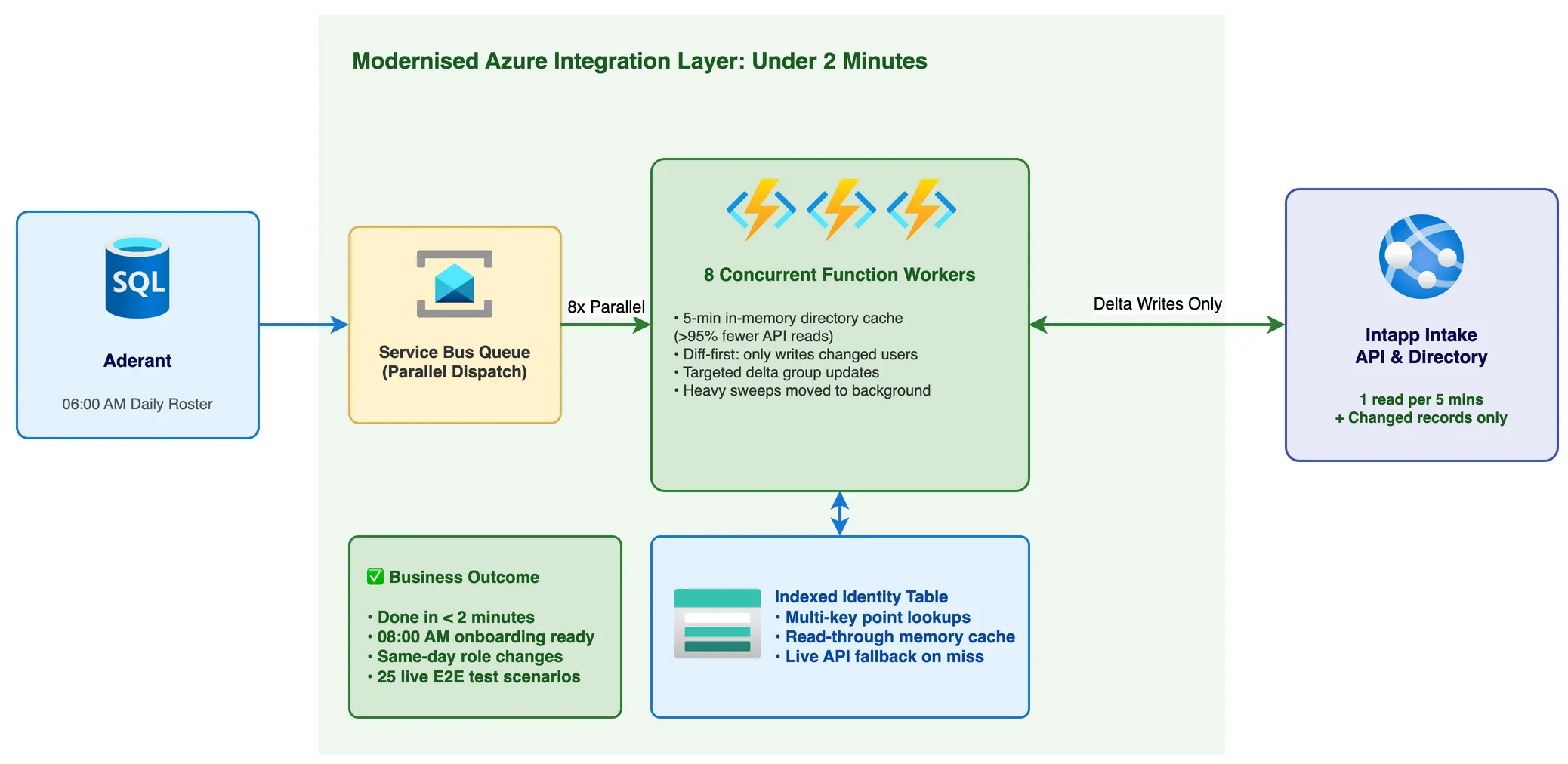
We broke the fix down into four practical changes across the Azure Functions and storage layer.
1. Read the Directory Once Every Five Minutes, Not Once Per Person
We introduced a short-lived in-memory directory cache on the worker instances with a 5-minute window and a single-flight lock so concurrent workers don’t stampede the API at startup.
When the 6:00 AM burst begins, the first worker fetches the active User and Person directories once and holds them in memory. Every subsequent message checks the in-memory lookup in microseconds.
That single change eliminated over 95% of the external API read calls during the morning sync.
In pseudocode, the per-message flow went from repeated full scans to a simple cached diff:
function ProcessStaffMember(incomingStaffRecord):
    // 1. Read the directory once every 5 minutes (single-flight lock)
    directory = GetCachedDirectoryOrFetchOnce(ttl: 5 minutes)
    existingRecord = directory.Find(incomingStaffRecord.Email)

    // 2. Only call the API if a managed field actually changed
    if HasChanged(existingRecord, incomingStaffRecord):
        UpdateIntappDirectory(incomingStaffRecord)

    // 3. Apply only the added or removed security groups
    groupDiff = CalculateGroupDelta(existingRecord.Groups, incomingStaffRecord.Groups)
    if groupDiff.HasChanges:
        ApplyGroupDelta(groupDiff)

    // 4. Upsert into the indexed lookup table
    UpsertIdentityLookupTable(incomingStaffRecord)
2. Only Write When Something Actually Changed
Before sending an update call to Intapp Intake, the processor now compares the incoming record against the cached directory entry across the fields the integration actually manages (such as name, email, active status, and timezone).
If nothing has changed, it skips the write completely. Instead of thousands of redundant API calls every morning, the system only writes the handful of records that genuinely changed overnight.
3. Move Heavy Housekeeping Off the Hot Path and Scale to 8 Workers
We moved the heavy daily group and colleague filter sweeps into their own scheduled background job, and replaced the per-message group logic with targeted delta updates:
- If a user’s roles haven’t changed, the group check does nothing and moves on immediately.
- If a user did change teams or permissions during the day, the processor calculates the exact difference and applies only the added or removed group. As a bonus, same-day permission changes now take effect straight away instead of waiting for the next morning.
With the slow, sequential sweeps off the main path, it was safe to process the queue in parallel. We increased the Service Bus concurrency from 1 to 8 concurrent workers, draining the morning queue in a fraction of the time without contention.
4. Replace the Single JSON File with an Indexed Lookup Table and Live Fallback
Finally, we retired the single shared JSON file in Blob Storage and replaced it with a partitioned Azure Table Storage lookup table.
Each person’s identity mapping is indexed across multiple partition keys so downstream workflows can look up a staff member in milliseconds by whichever detail they have on hand (email address, intake ID, or employee ID).
We paired that table with a three-tier read-through lookup:
- In-memory worker cache for instant resolution on the hot path.
- Indexed Azure Table Storage for a fast point lookup if the worker doesn’t have the person in memory.
- Live API fallback if the person isn’t in the table yet, querying the live directory on the spot and updating the table automatically before ever refusing a client or matter request.
Even better, when a client maintenance request references a Relationship Manager who has left the firm and is genuinely inactive, the integration no longer fails with a cryptic system error. Instead, it posts a clear, self-service comment directly on the Intapp Intake request naming the person, their role, and how the requester can reassign the client without raising a Service Desk ticket.
At-a-Glance Visibility with Azure Workbooks
Fixing the underlying architecture was only half the story. The support team also needed a way to see at a glance that the morning sync had succeeded and that every integration app was healthy, without digging through raw Application Insights logs.
We built a dedicated First Line Support dashboard using Azure Workbooks.
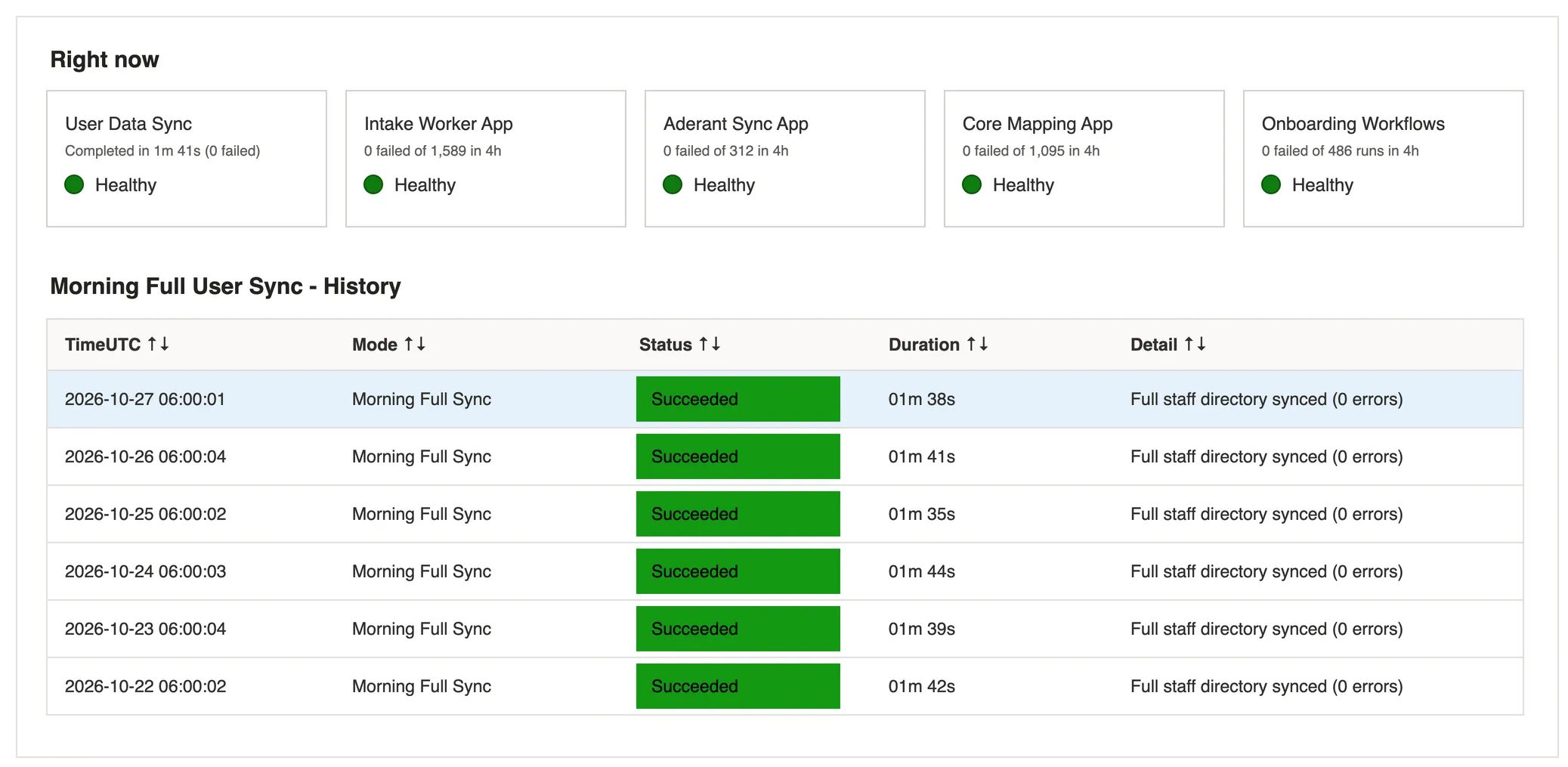
At the top of the workbook, status tiles show the real-time health of each Function App, Logic App workflow, and the User Data Sync over the last four hours. Below that, a history table tracks every 06:00 AM sync run, its exact completion time, and its status, paired with an automated Azure Monitor alert that verifies the morning run has completed before the working day begins.
Proving It Before Go-Live: Automated CI/CD and Live End-to-End Tests
When we first inherited this integration estate, deployments were manual and nerve-wracking. Alongside fixing the legacy code, we introduced automated CI/CD pipelines in Azure DevOps from scratch and built an automated end-to-end test suite.
Before any release goes to production, our pipeline runs up to 25 live end-to-end scenarios against the staging environment across Intapp Intake and Aderant:
- Creating new clients and matters and verifying they land in Aderant
- Updating existing client details and billing addresses
- Uploading Client Due Diligence (CDD) documents
- Recovering from missing or unresolvable participant identities
- Verifying self-service decline messages when a client’s Relationship Manager has left the firm
Every scenario runs against real staging APIs and verifies the distributed traces across Azure Functions, Service Bus, and Logic Apps before we promote the build to production.
The Result
When we deployed the new sync architecture to production just before 6:00 AM, the difference was immediate:
| Metric | Previous Design | After Modernisation |
|---|---|---|
| Morning User Sync Duration | ~2 hours (90 to 120 mins) | Under 2 minutes (and down to 45s on subsequent runs) |
| Directory API Scans per Run | Thousands (1 per person) | 1 every 5 minutes (>95% reduction) |
| Queue Concurrency | 1 worker (single-file queue) | 8 concurrent workers |
| Same-Day Permission Changes | Delayed until next morning | Immediate (delta group sync) |
| Missing User Cache Behaviour | Hard workflow failure | Indexed table + live API fallback |
More importantly for the business, lawyers and support teams arriving at 8:00 AM are no longer stuck waiting for the overnight sync to finish. Client onboarding and matter opening work first thing in the morning, role changes happen the same day, and releases go out through repeatable CI/CD pipelines backed by automated end-to-end tests and real-time Azure Workbook dashboards.